---
title: Microtransit | Second Line Transit
description: Book an on-demand ride in just a few taps with Second Line Microtransit. Get to work, school, errands, or a nearby bus stop with ease. Rides are $1.25 or less.
---
[Skip to content](https://ridesecondline.com/microtransit#main-content)
[](https://ridesecondline.com/?hsLang=en)
- Services
- [ Bus](https://ridesecondline.com/bus?hsLang=en)
- [ Microtransit](https://ridesecondline.com/microtransit)
- [ Paratransit](https://ridesecondline.com/paratransit?hsLang=en)
- Bus Routes
- [ Route A](https://ridesecondline.com/route-a?hsLang=en)
- [ Route B](https://ridesecondline.com/route-b?hsLang=en)
- [ Route C](https://ridesecondline.com/route-c?hsLang=en)
- [ Route D](https://ridesecondline.com/route-d?hsLang=en)
- [ Route E](https://ridesecondline.com/route-e?hsLang=en)
- [ Route F](https://ridesecondline.com/route-f?hsLang=en)
- [ Route G](https://ridesecondline.com/route-g?hsLang=en)
- [ Route H](https://ridesecondline.com/route-h?hsLang=en)
- [ Route I](https://ridesecondline.com/route-i?hsLang=en)
- [ Route J](https://ridesecondline.com/route-j?hsLang=en)
- [ Route K](https://ridesecondline.com/route-k?hsLang=en)
- [Fares & Passes](https://ridesecondline.com/fares?hsLang=en)
- FAQ
- [Newsroom](https://ridesecondline.com/en/newsroom?hsLang=en)
**Mobile’s new transit network starts September 28, 2026.**
# Ride across Mobile with Second Line Microtransit.
Get to destinations the bus doesn’t reach with Second Line Microtransit, six days a week. Book a trip, meet your driver at a nearby pickup point, and hop in. Wheelchair accessible vehicles are available.
[Download Now](https://mobilealabama.onelink.me/pqSJ/3nxop5j3)


## Service Information
Find out where our microtransit service is available, check for any current issues, and see when you can use it.

### Hours
- Monday - Thursday: 4:30am – 7:00pm
- Friday - Saturday: 4:30am – 9:00pm
- Sunday: no service

### Price
Rides are $1.25 each.
Students, seniors, riders with disabilities, and active military ride for $0.60 (ID required). Children age 5 and under ride free with a fare-paying adult.

### Payment Methods
Riders may pay with credit/debit card, cash, MyWave app/card, or transfer ticket.
Transfers between the bus and Microtransit are FREE. When boarding the first vehicle of your journey, your driver will provide you with a transfer ticket. Make sure to show that ticket on the second leg of your journey for a free ride. If you're using MyWAVE, just tap your app/card again, and the tranfer will be applied.

### Accessibility
Wheelchair Accessible Vehicles are available. To enable WAV or door-to-door service, [complete this form](https://ridewithvia.tfaforms.net/356754?cityid=687), or call (251) 344-6600.

[Download map](https://ridesecondline.com/hubfs/Second%20Line%20Microtransit%20Map.png?hsLang=en)
## Planning your trip is as easy as 1-2-3.
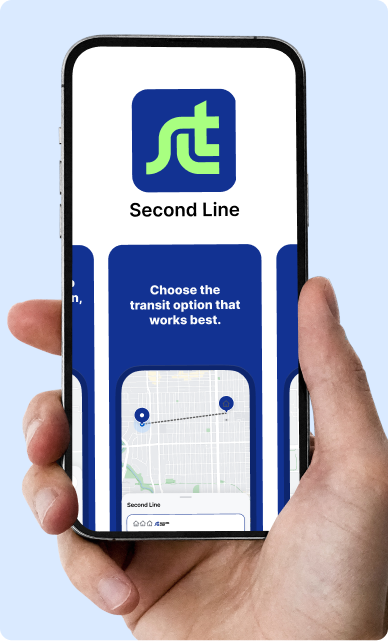
### 1. Create an account.
Download the SLT app from your preferred app store and follow the simple signup steps.
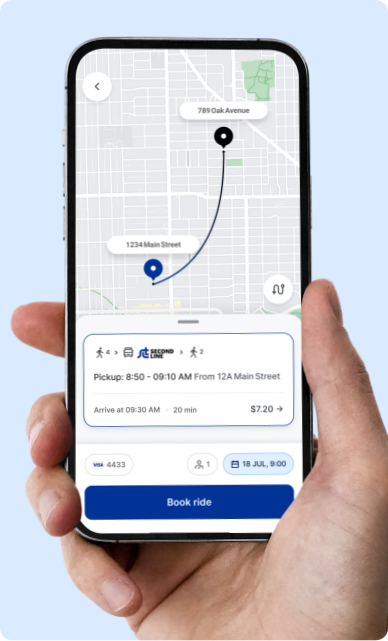
### 2. Book a ride.
Enter your pickup and dropoff locations, then choose the ride that works best for you. If your ride can be best served by the bus, we’ll show you. Wheelchair accessible vehicles are available.
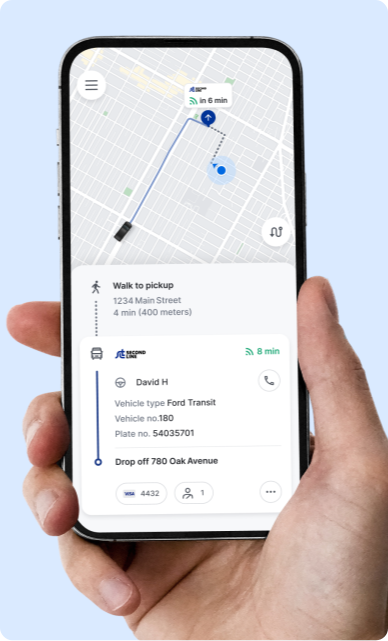
### 3. Meet your driver
Check out the app to find exactly where to meet the vehicle. To make the journey more efficient, **your pickup will be a short walk from where you are**.
# No Smartphone?
No problem.
Book a ride by calling (251) 344-6600.
Or [visit our online portal](https://secondline.app.ridewithvia.com/).
##  How does the service work?
What is Second Line Microtransit?
Second Line Microtransit is an on-demand public rideshare service. Enter your pickup and dropoff locations, meet your driver at the designated location, and we’ll get you to your destination.
Why do I have to walk to meet my ride?
To keep your ride efficient, Second Line Microtransit will pick you up at a nearby corner, usually just 2-4 minutes away by walking. If you have mobility needs, please fill out the accessibility form in the app or call (251) 344-6600.
What are the points of interest in the app?
Points of interest are stops in the service zone you can get rides to or from.
What do the vehicles look like?
All vehicles are branded with Second Line Transit’s logo and colors, so they should be easy to spot.
Some vehicles may still show MoGo branding.
Who will I be sharing my ride with?
Other passengers headed in the same direction may be picked up and dropped off during your trip. This keeps the service fast and affordable.
Are wheelchair accessible vehicles (WAV) available?
Yes — and if you need a WAV, we’ll pick you up right at your door. To request a WAV you must verify that you need wheelchair accessible service. Tap ‘Accessibility’ in the app menu and complete the Accessibility Request form, or call (251) 344-6600. If you have mobility needs and require curb-to-curb service but do not need a wheelchair accessible vehicle, please call Customer Support at (251) 344-6600.
Can I bring someone with me?
Yes! You can book rides for you and a maximum of two additional passengers.
Can I bring a service animal or pet with me?
Service animals are always welcome to ride without restriction. Drivers have a legal obligation to provide service to riders with service animals. If you experience an issue related to your service animal, email support-secondlinetransit@ridewithvia.com. Pets that are not service animals are also allowed, but should be kept in an airline-approved carrier.
Can I prebook a microtransit ride?
No. Second Line Microtransit offers on-demand rides only. When requesting a ride, try to request 20–30 minutes before you need to leave.
Can I book rides without a smartphone?
The easiest way to use the service is the Second Line Transit app. If you do not have a smartphone or need additional assistance, call our support team at (251) 344-6600 or [visit our online portal](https://secondline.app.ridewithvia.com/), and we’ll help you over the phone. You can also book on the web.
Why do I keep seeing bus options in the app?
The app shows the best available way to reach your destination — a microtransit ride, a bus, or a combination of the two. If a bus serves your trip just as easily, we may show you a bus option.
##  Ride Information
Can I edit my pickup or dropoff location?
Once you start a ride, the destination cannot be changed. If you have not yet boarded the vehicle, you can cancel the ride and re-book with a new pickup or destination address.
Why can’t I request a ride?
Sometimes, if we are experiencing high demand in your area, there may not be any vehicles or drivers currently available. If your travel plans are flexible, try requesting again in a few minutes. Calling will not increase your ability to book a ride — our agents book the same way you do in the app.
How do I know where and when to meet my driver?
Once a ride is confirmed, you will see your driver’s estimated time of arrival in the app and can follow their progress in real time. The app gives you directions to your virtual bus stop, which may be a short walk away. Follow the dotted line to your exact pickup spot.
What should I do if my driver leaves without me?
Re-book your ride in the app, then email support-secondlinetransit@ridewithvia.com explaining the situation.
How do I cancel my ride?
Cancel your ride directly in the app or by calling our support team. Canceling at the last minute affects other riders, so please cancel as soon as you know you don’t need a ride.
How do I report an item I left behind in the vehicle?
Email support-secondlinetransit@ridewithvia.com with a description of the missing item. We will do our best to track it down and let you know where you can pick it up.
Can I leave feedback for my driver?
Fill out the ride feedback screen in the app after your ride.
How do I report a complaint?
Contact our support team at support-secondlinetransit@ridewithvia.com or (251) 344-6600. Include as much information as possible.
##  Account Information
How do I update my account information (phone number, name)?
Navigate to the menu in the top left corner of the app and tap your name at the top. Then tap your name, email, or phone number to update it.
How do I reset my password?
Open the app and select ‘Get Started.’ In the password box, select ‘Forgot your password?’ and follow the prompts.
How do I add favorite addresses?
Navigate to the menu in the top left corner of the app and tap ‘Favorites’, then tap ‘Set Home Address’, ‘Set Work Address’, or create and name a new favorite. Saved favorites appear as quick options on the home screen.
How do I delete my account?
Navigate to the menu in the top left corner of the app and tap your name or profile picture at the top, then tap ‘Delete my account’ at the bottom of the page. To request that your data be deleted, email Via’s support team at support@ridewithvia.com.
##  Payment Information
How do I pay for my rides?
When you create your account, add a debit or credit card (including prepaid debit cards). The card on file is charged automatically once you complete a ride. Apple Pay and Google Pay are also accepted in the app. You can also pay onboard with cash, your MyWAVE card, or the MyWAVE app.
How do I add or edit a payment method?
Navigate to the menu in the top left corner of the app and tap ‘Payment Methods’. Tap a method to edit it, or tap ‘Add a new payment method.’
Do I tip the driver?
No. Our drivers do not accept tips.
Why do I see a pending charge?
A hold is not a charge. When a new credit card is added, a $1 hold is placed to confirm the card is valid. When a ride is booked that is expected to cost more than $15, a hold is placed for the ride amount. Holds typically disappear within 3–5 business days, depending on your bank.
How can I dispute a no-show charge?
You may be charged for a no-show if you were not at your pickup point on time and the driver waited but you did not board or make contact. If you believe you were charged inaccurately, email support-secondlinetransit@ridewithvia.com.
Are there any discounts available?
Discounts are available with ID for students, seniors 65+, riders with disabilities, and military. Children age 5 and under ride free with a fare-paying adult. Update your fare type in the app menu under your name, or call us. Please carry appropriate ID.
How do I apply a promo code?
Open the menu in the top left corner of the app and select ‘Promo Codes’, then enter your code. Some promotions are time limited or restricted; if a code errors it is likely no longer valid.
## Our services.
### [ Bus](https://ridesecondline.com/bus?hsLang=en)
### [ On Demand](https://ridesecondline.com/microtransit)
### [ Paratransit](https://ridesecondline.com/paratransit?hsLang=en)
### [ Fares & passes](https://ridesecondline.com/fares?hsLang=en)
Quick links
[Bus](https://ridesecondline.com/bus?hsLang=en) [Microtransit](https://ridesecondline.com/microtransit) [Paratransit](https://ridesecondline.com/paratransit?hsLang=en) [Fares & Passes](https://ridesecondline.com/fares?hsLang=en) [FAQ](https://ridesecondline.com/home?hsLang=en#faq)
Resources
[Newsroom](https://ridesecondline.com/en/newsroom?hsLang=en) [Transition](https://ridesecondline.com/transition?hsLang=en) [Network Redesign](https://ridesecondline.com/network-redesign?hsLang=en) [Careers](https://ridewithvia.com/careers/jobs)
Contact us
[251-344-6600](tel:2513446600) [support@ridesecondline.com](mailto:support@ridesecondline.com) [GM&O Transit Center](https://www.google.com/maps/place/GM%26O+Transit+Center+-+110+Beauregard+St+-+Mobile/@30.7017294,-88.0489202,825m/data=!3m2!1e3!4b1!4m6!3m5!1s0x889a502be26a9e9d:0x26a81684ba830431!8m2!3d30.7017294!4d-88.0463453!16s%2Fm%2F040fv67?entry=tts&g_ep=EgoyMDI2MDkyMy4wIPu8ASoASAFQAw%3D%3D&skid=182a86ea-7baf-4df2-b9ac-a6b33aef69b5) [110 Beauregard Street, #104](https://www.google.com/maps/place/GM%26O+Transit+Center+-+110+Beauregard+St+-+Mobile/@30.7017294,-88.0489202,825m/data=!3m2!1e3!4b1!4m6!3m5!1s0x889a502be26a9e9d:0x26a81684ba830431!8m2!3d30.7017294!4d-88.0463453!16s%2Fm%2F040fv67?entry=tts&g_ep=EgoyMDI2MDkyMy4wIPu8ASoASAFQAw%3D%3D&skid=182a86ea-7baf-4df2-b9ac-a6b33aef69b5) [Mobile, AL 36602](https://www.google.com/maps/place/GM%26O+Transit+Center+-+110+Beauregard+St+-+Mobile/@30.7017294,-88.0489202,825m/data=!3m2!1e3!4b1!4m6!3m5!1s0x889a502be26a9e9d:0x26a81684ba830431!8m2!3d30.7017294!4d-88.0463453!16s%2Fm%2F040fv67?entry=tts&g_ep=EgoyMDI2MDkyMy4wIPu8ASoASAFQAw%3D%3D&skid=182a86ea-7baf-4df2-b9ac-a6b33aef69b5) [Hours: M-F 8am-5pm](https://www.google.com/maps/place/GM%26O+Transit+Center+-+110+Beauregard+St+-+Mobile/@30.7017294,-88.0489202,825m/data=!3m2!1e3!4b1!4m6!3m5!1s0x889a502be26a9e9d:0x26a81684ba830431!8m2!3d30.7017294!4d-88.0463453!16s%2Fm%2F040fv67?entry=tts&g_ep=EgoyMDI2MDkyMy4wIPu8ASoASAFQAw%3D%3D&skid=182a86ea-7baf-4df2-b9ac-a6b33aef69b5)
### Download the Second Line Transit App
[](https://ridesecondline.com/hs/cta/wi/redirect?encryptedPayload=AVxigLKbJe3X9XY%2BbSfMcT3LhYOX0W9B4U2EoUpNN8LLyj8zXLlJDBupkW3STDQFNd06h2glk91yB61bhgWkXq2XQJKogxY9RYRbmKGcGLhia%2Fn7XpUAgm4DteaJt2FLrazzhQos4X9oSKh2gBEd%2B4hqP%2Fkn%2FzsZJb%2BySGriN7d%2BJ0mrsKVhi9FRGZMmz2NF%2B4ZbScQRHpRa%2Bim8Y4KuBwTsUTWQwy%2FAyg%3D%3D&webInteractiveContentId=222724441696&portalId=51613600&hsLang=en)
[](https://ridesecondline.com/hs/cta/wi/redirect?encryptedPayload=AVxigLIB%2B8YmU6UwVQ5AjCTEUToowPbrdRyO3c%2B6g39ijf%2FppkGOfPwy7HKDj%2BDQc7NXCfWvmu18BQj8uEY%2BqukL%2Fht5mFjH0d0yLLRN%2FWlt1FvH5oFuvNASFMtMAMWBXrMzVNFPTeUkX4pB1x2oqenq4wcncN1JiLsfpM3qxYxoXbOvm13MScFZV0RpykmajZERcIWaGTsrX5Sfiz%2B9iFft&webInteractiveContentId=222724286120&portalId=51613600&hsLang=en)
[](https://facebook.com/secondlinetransit)
[](https://ridesecondline.com/home?hsLang=en) [](https://ridewithvia.com/)
© Second Line Transit
[Privacy Policy](https://ridewithvia.com/legal/privacy?hsLang=en) [Cookie Policy](https://ridewithvia.com/legal/cookie-notice)