Paratransit

If you ride paratransit today

What's changing?
- Service area boundaries change to a new core ADA zone. If you live outside the new zone, or you have taken a ride outside the new zone in the last three months, you are eligible to ride in the Extended Access zone, slightly beyond the new borders.
- Booking by phone: call (251) 344-5656 to book your rides.
- Second Line Transit app: book rides, track your vehicle in real time, and pay by credit or debit card, Apple Pay, or Google Pay.
- Web app: you can also book rides online.
- New payment option: credit and debit cards are now accepted, in addition to the Mobility MyWAVE card and digital MAP ticket.

What's staying the same?
- Service hours are remaining
Monday – Saturday, 4:30am – 10:00pm. - Rides are still $2.50 each, and you can still use your MyWAVE card or a digital MAP ticket.
- You can still prebook rides up to 14 days in advance, at least 24 hours ahead of your departure time.
- The drivers you know will continue to help you get around.
- Eligibility: if you are already eligible for paratransit, your status transfers automatically. There is no need to re-apply.
Service Information

Service Hours
Monday – Saturday: 4:30am – 10:00pm

Price

Payment Methods
- Credit card (already available today)
- Cash (new)
- MyWAVE app/card (new)
- Ticket (new)

Contact Us
support-secondlinetransit@ridewithvia.com
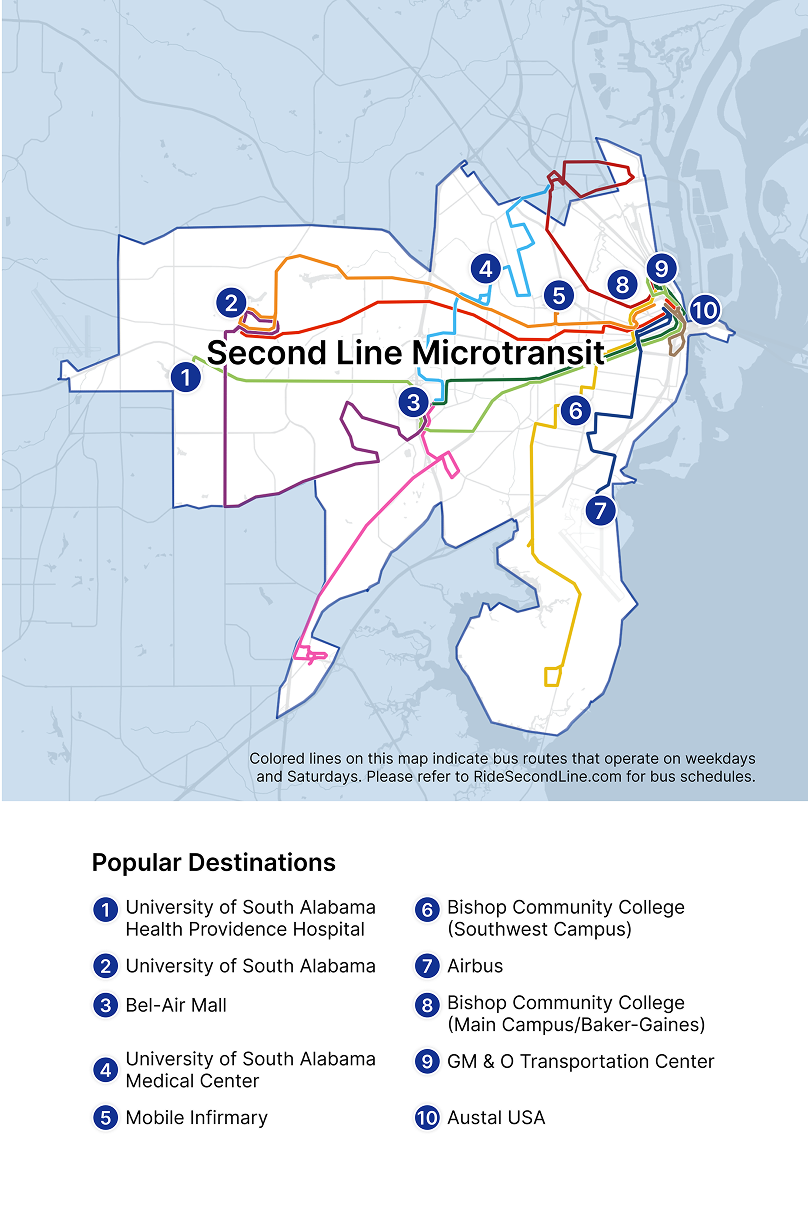
Colored lines on this map indicate bus routes that operate on weekdays and Saturdays.
Planning your trip is as easy as 1-2-3.
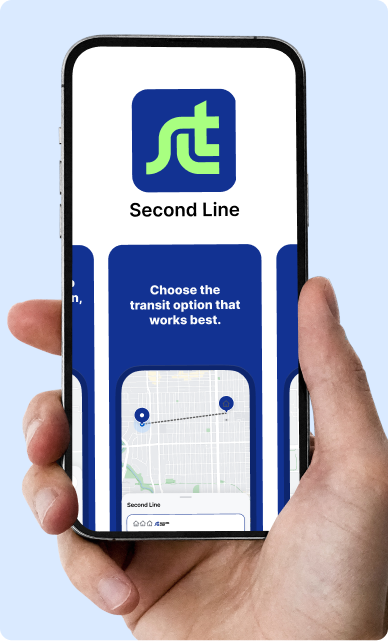
1. Create an account.
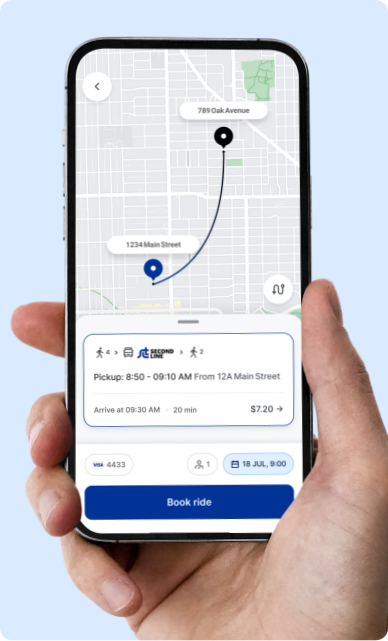
2. Book a ride.
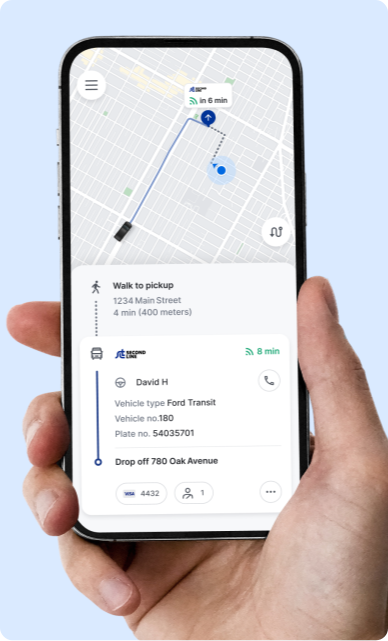
3. Start your trip.
No smartphone?

 How does the service work?
Second Line Microtransit is an on-demand public rideshare service. Enter your pickup and dropoff locations, meet your driver at the designated location, and we’ll get you to your destination.
All vehicles are branded with Second Line Transit’s logo and colors, so they should be easy to spot.
Other passengers headed in the same direction may be picked up and dropped off during your trip. This keeps the service fast and affordable.
Yes — and if you need a WAV, we’ll pick you up right at your door. To request a WAV you must verify that you need wheelchair accessible service. Tap ‘Accessibility’ in the app menu and complete the Accessibility Request form, or call (251) 344-6600. If you have mobility needs and require curb-to-curb service but do not need a wheelchair accessible vehicle, please call Customer Support at (251) 344-6600.
No. Second Line Microtransit offers on-demand rides only. When requesting a ride, try to request 20–30 minutes before you need to leave.
The easiest way to use the service is the Second Line Transit app. If you do not have a smartphone or need additional assistance, call our support team at (251) 344-6600 and we’ll help you over the phone. You can also book on the web.
The app shows the best available way to reach your destination — a microtransit ride, a bus, or a combination of the two. If a bus serves your trip more just as easily, we may show you a bus option.
 Ride Information
Once you start a ride, the destination cannot be changed. If you have not yet boarded the vehicle, you can cancel the ride and re-book with a new pickup or destination address.
Sometimes, if we are experiencing high demand in your area, there may not be any vehicles or drivers currently available. If your travel plans are flexible, try requesting again in a few minutes. Calling will not increase your ability to book a ride — our agents book the same way you do in the app.
Once a ride is confirmed, you will see your driver’s estimated time of arrival in the app and can follow their progress in real time. The app gives you directions to your virtual bus stop, which may be a short walk away. Follow the dotted line to your exact pickup spot.
Cancel your ride directly in the app or by calling our support team. Canceling at the last minute affects other riders, so please cancel as soon as you know you don’t need a ride.
Email support-secondlinetransit@ridewithvia.com with a description of the missing item. We will do our best to track it down and let you know where you can pick it up.
Fill out the ride feedback screen in the app after your ride.
Contact our support team at support-secondlinetransit@ridewithvia.com or (251) 344-6600. Include as much information as possible.
 Account Information
Navigate to the menu in the top left corner of the app and tap your name at the top. Then tap your name, email, or phone number to update it.
Open the app and select ‘Get Started.’ In the password box, select ‘Forgot your password?’ and follow the prompts.
Navigate to the menu in the top left corner of the app and tap ‘Favorites’, then tap ‘Set Home Address’, ‘Set Work Address’, or create and name a new favorite. Saved favorites appear as quick options on the home screen.
Navigate to the menu in the top left corner of the app and tap your name or profile picture at the top, then tap ‘Delete my account’ at the bottom of the page. To request that your data be deleted, email Via’s support team at support@ridewithvia.com.
Payment Information
When you create your account, add a debit or credit card (including prepaid debit cards). The card on file is charged automatically once you complete a ride. Apple Pay and Google Pay are also accepted in the app. You can also pay onboard with cash, your MyWAVE card, or the MyWAVE app.
A hold is not a charge. When a new credit card is added, a $1 hold is placed to confirm the card is valid. When a ride is booked that is expected to cost more than $15, a hold is placed for the ride amount. Holds typically disappear within 3–5 business days, depending on your bank.
Discounts are available with ID for students, seniors 65+, riders with disabilities, and military. Children age 5 and under ride free with a fare-paying adult. Update your fare type in the app menu under your name, or call us. Please carry appropriate ID.
Open the menu in the top left corner of the app and select ‘Promo Codes’, then enter your code. Some promotions are time limited or restricted; if a code errors it is likely no longer valid.


